
Introduction: Why Power Apps Code Apps Matter
For years, Power Platform developers faced a trade-off. Low-code tools such as canvas apps were fast and governed, but pixel-level control and modern front-end tooling were limited. Fully custom web apps gave developers freedom, but they meant building authentication, hosting, security and governance from scratch.
Power Apps code apps close that gap. They let you build a web application in the IDE and framework you already use (React, Vue and others), then run it on the Power Platform managed host. According to Microsoft, code apps in Power Apps are now generally available, and the February 2026 feature update lists them as generally available: host and run code apps in Power Apps . Because individual Learn pages can still carry older preview labels, always confirm the current status in the official documentation before committing a production roadmap.
In this guide you will learn what code apps are, how they work, how they compare with canvas apps, what the technology stack looks like, and how to build and deploy your first app. Along the way you will see code snippets, architecture diagrams and real-world scenarios for Dynamics 365 and Dataverse projects.
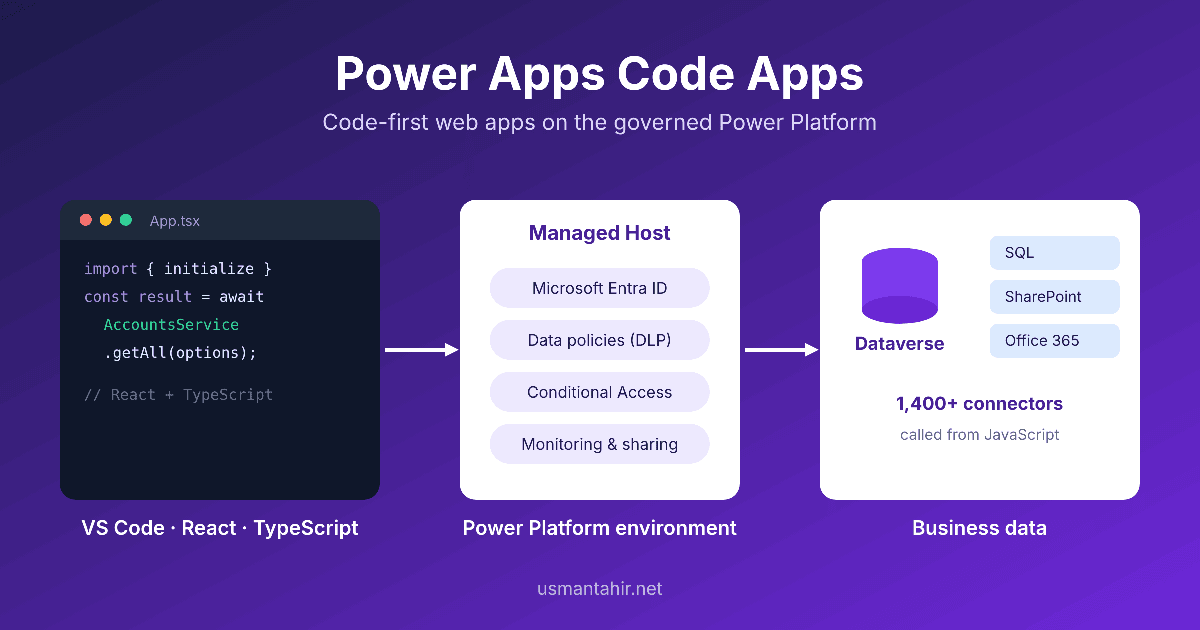
What Are Power Apps Code Apps?
Microsoft describes the feature simply: code apps let developers bring Power Apps capabilities into custom web apps built in a code-first IDE, and you can develop locally and run the same app in Power Platform.
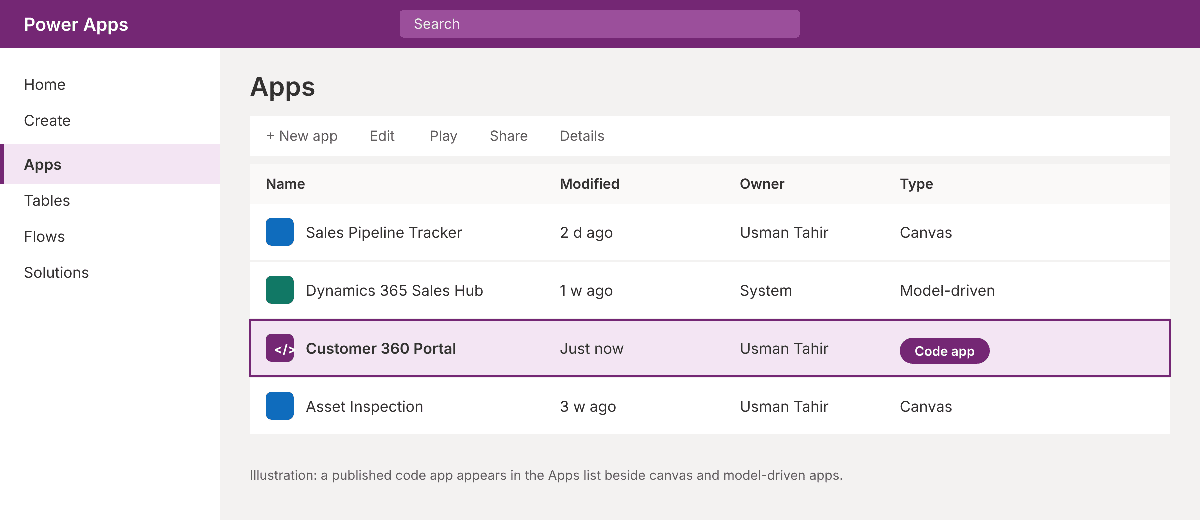
In plain terms, a code app is a standard single-page web application (for example, a React and TypeScript project built with Vite) that is packaged and published to a Power Platform environment. Once published, it shows up in Power Apps like any other app. It can be shared, governed and monitored, but you wrote the user interface and logic yourself.
The purpose of code apps
- Give professional developers a native path into Power Platform. You keep Git-style workflows, npm packages, component libraries, unit tests and your preferred IDE.
- Avoid rebuilding enterprise plumbing. Microsoft Entra ID sign-in, connector authorization, and data policy enforcement come from the platform.
- Keep IT in control. Every code app becomes a managed Power Platform asset that administrators can see and govern.
Why Microsoft introduced them
Microsoft’s announcement ties the feature to the rise of AI-assisted development: teams can build high-quality web apps faster than before while IT faces mounting expectations around governance, security and operational oversight. Code apps are the answer to both sides of that pressure. Developers get speed and freedom, and IT gets a managed host.
Key features at a glance
| Feature | What it means for you |
|---|---|
| Code-first development | Build in VS Code or any IDE with React, Vue or other frameworks |
| Connector access | Access 1,400+ connectors directly from JavaScript, called like any other API (the Learn overview cites 1,500+, so treat the exact figure as approximate) |
| Microsoft Entra authentication | Zero-config sign-in, no custom auth flow to build |
| Managed host | Hosted and run inside Power Platform |
| Governance | Data policies (DLP), Conditional Access, sharing limits, app quarantine |
| Monitoring | Health metrics, plus alerts and data metrics in Power Platform monitor |
| Simplified ALM | Deployment and versioning through Power Platform tooling |
How Power Apps Code Apps Work
The architecture in one picture
A code app has three cooperating parts:
- Your application code, a static web bundle (HTML, JavaScript, CSS) compiled from your TypeScript project.
- The Power Apps client library (SDK), the
@microsoft/power-appsnpm package that lets your code talk to the Power Apps host, connectors and Dataverse. - The Power Platform managed host, which serves the bundle, authenticates the user with Microsoft Entra ID, enforces data policies, and brokers calls to connectors.
+--------------------+      power-apps push      +---------------------------------+
|  Developer machine |-------------------------->|  Power Platform environment     |
|  VS Code, Node.js  |                           |  +---------------------------+  |
|  React + TypeScript|                           |  |  Managed host             |  |
|  @microsoft/       |      npm run dev          |  |  Entra ID auth, DLP,      |  |
|  power-apps SDK    |<--- Local Play ---------->|  |  Conditional Access       |  |
+--------------------+                           |  +-------------+-------------+  |
                                                 |                |                |
                                                 |   Dataverse / 1,400+ connectors |
                                                 +---------------------------------+
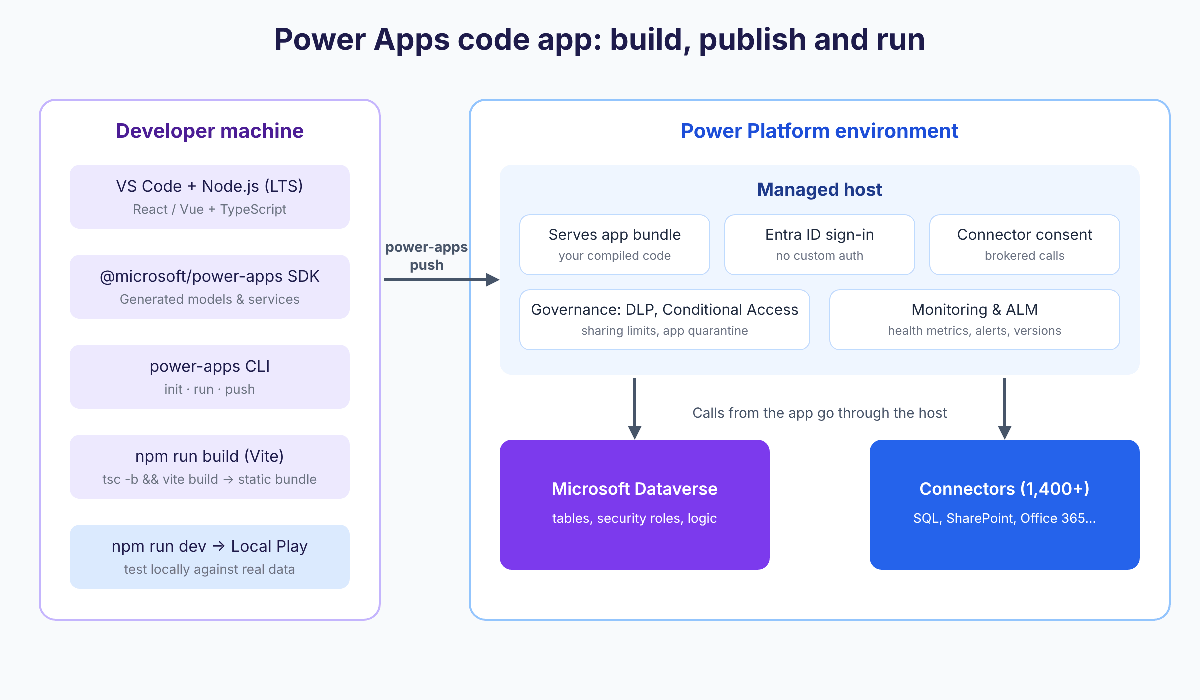
The development approach
The development loop is deliberately familiar:
- Scaffold a project from Microsoft’s Vite template.
- Initialize it against a Power Platform environment.
- Add data sources (Dataverse tables or connectors) and let the tooling generate typed models and services.
- Run locally with a dev server and test in the browser against real data.
- Build and push a new version to the environment.
When you run locally, you open the Local Play URL in the same browser profile that is signed in to your Power Platform tenant. Microsoft also notes that since December 2025, Chrome and Microsoft Edge block requests from public origins to local endpoints by default, so you may need to grant a browser permission during development.
Initializing the SDK
Your app must tell the host it is ready, and wait for the SDK before touching data. The official guidance is to implement logic in App.tsx that waits for the SDK to fully initialize before any data operations. A simplified version looks like this:
import { useEffect, useState } from "react";
import { initialize } from "@microsoft/power-apps/app";

export default function App() {
  const [ready, setReady] = useState(false);
  const [error, setError] = useState<string | null>(null);

  useEffect(() => {
    const init = async () => {
      try {
        await initialize();      // wait for the Power Apps host
        setReady(true);
      } catch {
        setError("Failed to initialize Power Apps SDK");
      }
    };
    init();
  }, []);

  if (error) return <p>{error}</p>;
  if (!ready) return <p>Loading…</p>;
  return <AccountsList />;
}
Note: the import path and helper names can change between SDK versions. The starter template includes a PowerProvider component that already does this, so start from the template and check the current SDK reference.
Key Features and Capabilities
Supported frameworks and developer tooling
- Frameworks: Microsoft highlights popular frameworks like React and Vue, or your framework of choice.
- Tooling: Your IDE of choice (for example Visual Studio Code), Node.js (LTS version), and the Power Apps CLI.
- npm-based CLI: The code apps npm CLI has four commands: init, run, push and find-dataverse-api. Microsoft states that this CLI reduces prerequisites and will replace the Power Platform CLI’s pac code commands, which will be deprecated in a future release.
- Samples: The official PowerAppsCodeApps GitHub repository hosts templates and sample projects, including a Dataverse demo app.
Data and integration
- Dataverse: CRUD operations, delegation for filter, sort and top queries, paging, option-set formatted values and lookups through generated services.
- Connectors: Azure SQL, SharePoint, Office 365 Users and many more through the connector framework.
- Custom APIs: Code apps can invoke APIs outside Power Platform connectors, for example your own Azure Functions endpoint (always pair this with your own security review).
Governance and security (the managed platform)
The managed host is the real differentiator. Microsoft lists these capabilities as working for code apps:
- Connector consent dialogs for end users
- Sharing limits that follow canvas app limits
- App quarantine
- Data loss prevention (data policy) enforcement at app launch
- Conditional Access on an individual app
- Tenant isolation and Azure B2B for external user access
- Health metrics in the Power Platform admin center and maker portal
Microsoft’s April 2026 update added alerting and data metrics for code apps in Power Platform monitor, which gives operations teams proactive notifications for pro-dev apps in the same place as low-code apps.
Customization options
Because you own the front end, you control layout, accessibility, design systems (Fluent UI, Material UI, Tailwind), state management, routing, charting libraries and test automation. This is the biggest practical difference from canvas apps.
Power Apps Code Apps vs. Traditional Canvas Apps
Both app types run on Power Platform and use connectors, but the way you build them is very different.
| Aspect | Canvas apps | Code apps |
|---|---|---|
| Authoring | Visual studio with Power Fx formulas | Your IDE with TypeScript and JavaScript |
| UI control | Limited to controls and components | Full control with any web UI library |
| Source control | Solution-based; export and unpack | Standard Git workflow in your own repo (note: the Power Platform Git integration is not supported for code apps) |
| Testing | Test Studio and manual testing | Jest, Vitest, Playwright, Cypress and your own CI |
| Reuse | Component libraries | npm packages and shared libraries |
| Mobile | Power Apps mobile and Windows apps | Browser-based; not supported in the Power Apps mobile app or Power Apps for Windows |
| Speed for simple apps | Very fast for citizens makers | Slower start, faster for complex UI |
| Skills needed | Low-code, Excel-style formulas | Web development (React, TypeScript) |
| Governance | Managed platform | Managed platform (same major controls) |
Advantages of code apps
- Pixel-perfect, modern user interfaces
- Mature engineering practices: code review, unit tests, linting, CI/CD
- Easy reuse of existing web components and libraries
- Compatibility with AI coding assistants, which work well with TypeScript projects
Limitations to know before you start
Based on Microsoft’s current documentation, plan around these:
- End users need a Power Apps Premium license.
- Not supported in the Power Apps mobile app or Power Apps for Windows.
- No support yet for Content Security Policy (CSP) or the Storage SAS IP restriction. For IP-based restrictions, Microsoft points to Conditional Access, since code apps authenticate with Microsoft Entra ID.
- No Power Platform Git integration and no native Azure Application Insights integration.
- No PowerBIIntegration function, although you can embed code apps in Power BI reports using the Power Apps visual.
- No SharePoint forms integration.
- Service principals cannot create or own code apps.
- Dataverse gaps documented at the time of writing include polymorphic lookups and FetchXML. Check the Dataverse how-to for the latest status, since this list is evolving.
Rule of thumb: choose canvas apps for fast departmental apps built by makers, and choose code apps when you need a custom experience, an engineering workflow, or reuse of an existing web stack.
Technology Stack Explained
| Technology | Role in a code app |
|---|---|
| React | The UI library most commonly used in Microsoft’s samples and templates. Vue and other frameworks are also possible. |
| TypeScript | Adds static typing. The generated Dataverse models and services are typed, so you get IntelliSense and compile-time checks. |
| JavaScript | The runtime language of the compiled bundle, and still valid for simpler projects. |
| Vite | The build tool used by the starter template. The build script runs tsc -b && vite build. |
| Visual Studio Code | The recommended IDE, with debugging, extensions and AI assistants. |
| Node.js and npm | Package management and the new power-apps CLI. |
| Power Apps client library | @microsoft/power-apps: initialization, connector and Dataverse access, context data. |
| Dataverse | The primary business data platform for Dynamics 365 and Power Platform; accessed through generated services. |
| Connectors | Azure SQL, SharePoint, Office 365 and more, called from JavaScript. |
| Power Platform admin center | Enables code apps per environment and manages governance. |
Working with Dataverse from TypeScript
When you add Dataverse as a data source, the system automatically generates model and service files and places them in the generated services folder. For the built-in Accounts table, you get AccountsModel.ts and AccountsService.ts.
Add the table with the CLI (the documentation currently shows the PAC form):
pac code add-data-source -a dataverse -t accountThen query with typed options. The official getAll options support select, filter, orderBy and top:
import { AccountsService } from "./generated/services/AccountsService";
import type { Accounts } from "./generated/models/AccountsModel";

export async function loadUsAccounts(): Promise<Accounts[]> {
  const options = {
    select: ["name", "accountnumber", "address1_city"],
    filter: "address1_country eq 'USA'",
    orderBy: ["name asc"],
    top: 50,
  };

  try {
    const result = await AccountsService.getAll(options);
    return result.data || [];
  } catch (err) {
    console.error("Failed to fetch accounts:", err);
    return [];
  }
}
Creating and updating records follows the same pattern:
// Create: omit system-managed columns such as the primary key
const newAccount = { name: "Contoso Ltd", accountnumber: "ACC001" };
const created = await AccountsService.create(
  newAccount as Omit<Accounts, "accountid">
);

// Update: send only the columns that actually changed
await AccountsService.update(accountId, { name: "Contoso Holdings" });
Microsoft’s guidance on updates is worth repeating: only send changed fields. False updates can trigger business logic that expects the values to have changed and can corrupt audit data.
Calling other connectors
For non-Dataverse connections you first create the connection in Power Apps, then register it with the CLI, for example:
pac code add-data-source -a "shared_office365users" -c "<connectionId>"Tabular sources such as Azure SQL also need a table and dataset name. See Microsoft’s connect to data guide for the full walkthrough.
Real-World Use Cases
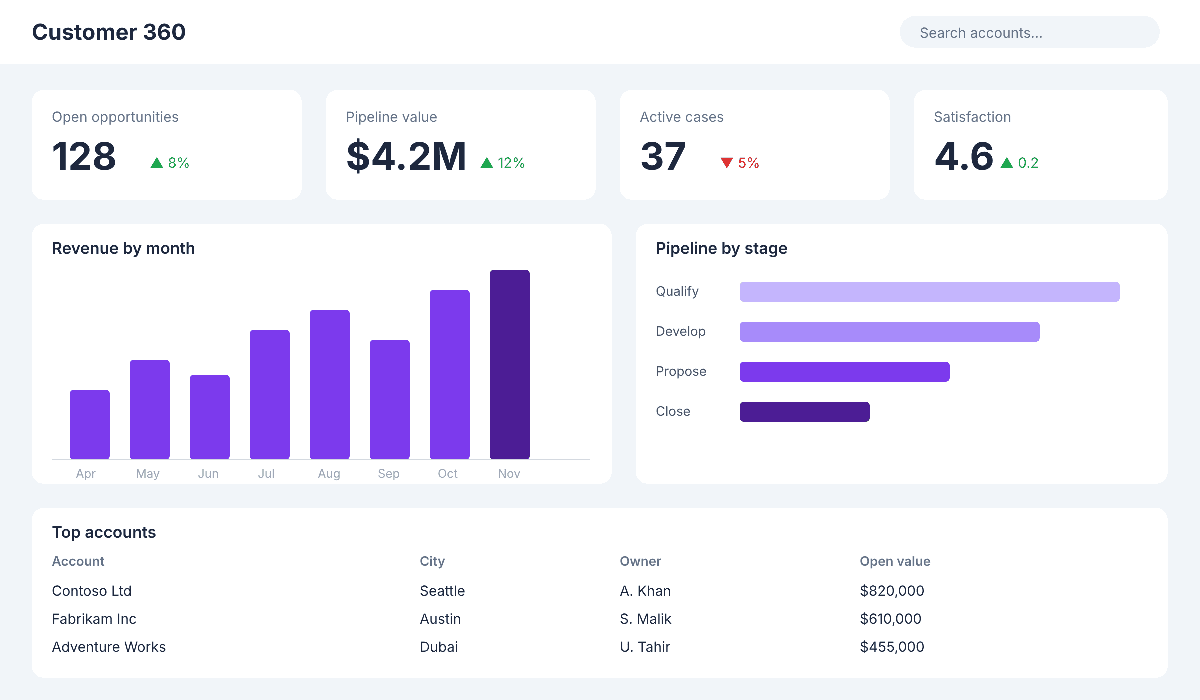
1. Customer 360 portal for Dynamics 365 Sales
A React dashboard that combines account, opportunity and case data from Dataverse with Office 365 Users profile data. Sales managers get a fast, tailored view that would be awkward to build with standard controls, and the app still inherits Entra sign-in and data policies.
2. Field service and inspection tools
A responsive web app for technicians that captures structured inspection data, validates it with TypeScript rules, and writes to Dataverse. (Remember that code apps are not supported in the Power Apps mobile app, so this fits browser-based mobile use rather than offline scenarios.)
3. Executive dashboards with rich visualization
Charting libraries such as Recharts or D3 let you build interactive KPI dashboards with drill-down that go beyond standard chart controls, with data sourced from Dataverse and Azure SQL.
4. Internal line-of-business tools
Microsoft positions code apps for the easy publishing and hosting of line-of-business web apps in Power Platform. Think asset management, approvals, intake forms and resource planning, built once and governed centrally.
5. Migrating existing web apps
Teams with an existing internal React app can bring it under Power Platform governance rather than maintaining separate authentication and hosting.
6. Partner and external user scenarios
Using Azure B2B, you can share apps with external users in a tenant, with the same style of controls used for canvas apps.
Benefits for Developers and Businesses
For professional developers
- Use the languages, frameworks and tools you already know.
- Treat the app like any other codebase: pull requests, tests, linting and pipelines.
- Skip building authentication and connector plumbing.
- Get immediate feedback by running locally against real environment data.
For Power Platform and Dynamics 365 developers
- Extend beyond the limits of canvas controls without leaving the platform.
- Combine low-code and pro-code in one environment: Dataverse tables, Power Automate flows and code apps together.
- Reuse Dataverse security roles and business logic.
For organizations and IT
- Every code app is a visible, governed asset with data policies, Conditional Access and quarantine controls.
- Monitoring and alerting in Power Platform monitor, available alongside low-code apps.
- Reduced shadow IT, because teams who want full code flexibility no longer have to host apps elsewhere.
- Lower security risk through platform-provided authentication and connector consent.
Getting Started: Build and Deploy Your First Code App
Prerequisites
- A Power Platform environment (a Developer plan environment is fine for learning) with Dataverse if you plan to use it.
- Code apps enabled on that environment by an admin.
- End users licensed with Power Apps Premium.
- Visual Studio Code, Node.js (LTS) and Git. Microsoft’s pages list these as the typical developer tools.
Step 1: Enable code apps in the environment
In the Power Platform admin center, go to Manage > Environments, select your environment, then Settings > Product > Features. Turn on the Enable code apps toggle and select Save. For many environments, you can use environment groups and rules.
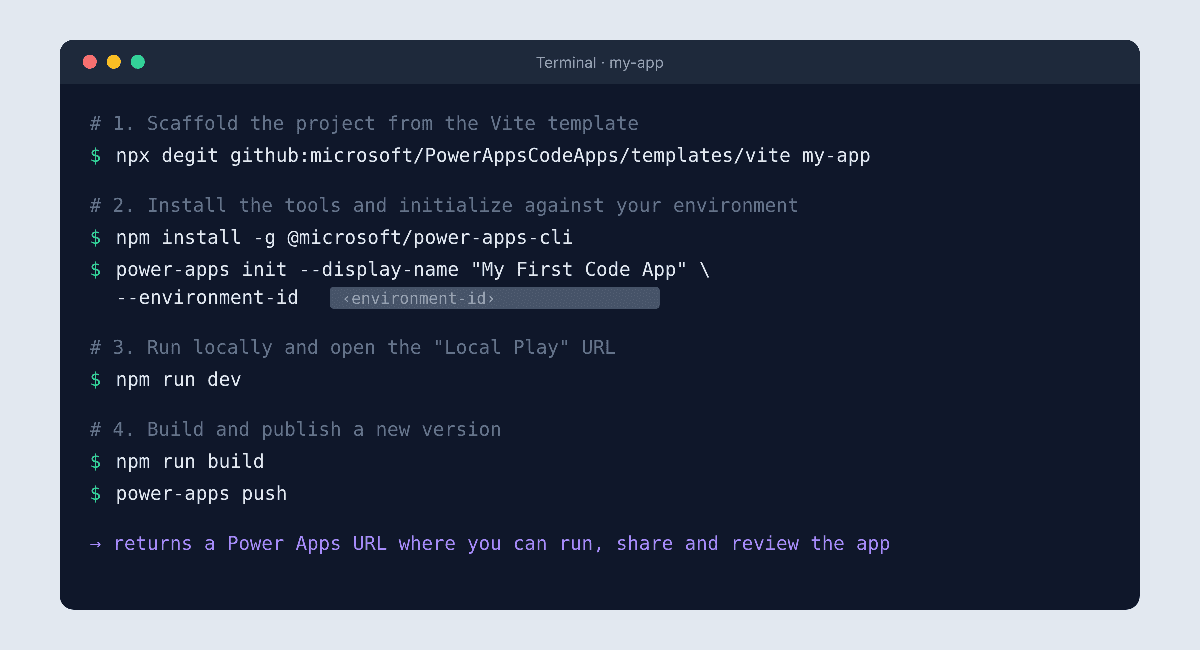
Step 2: Scaffold the project
npx degit github:microsoft/PowerAppsCodeApps/templates/vite my-app
cd my-app
Step 3: Install the tools and initialize
Per the npm quickstart (library version 1.0.4 and higher):
npm install -g @microsoft/power-apps-cli
npm install -g @microsoft/power-apps
npm install

power-apps init --display-name "My First Code App" --environment-id <your-environment-id>
The CLI prompts you to sign in with your Power Platform account. You can also run power-apps init without options for interactive prompts.
Step 4: Run and test locally
npm run devOpen the Local Play URL in the same browser profile as your Power Platform tenant.
Step 5: Add a data source
Add Dataverse tables or connectors as described above, and use the generated services in your components. Remember to wait for SDK initialization before making data calls.
Step 6: Build and publish
npm run build
power-apps push
When the command completes, it returns a Power Apps URL. Open it, then use the Power Apps portal to play, share or review details of your app.
Practical tips
- Use TypeScript strictly. Generated models are your safety net against schema errors.
- Select only the columns you need in Dataverse queries for better performance.
- Handle errors and loading states everywhere you call a service.
- Keep secrets out of the front end. Anything shipped in the bundle is visible to the browser, so route sensitive logic through connectors or a secured API.
- Set up CI/CD. Build in a pipeline, then deploy with the CLI or Power Platform ALM tooling.
- Plan for the CLI transition. Microsoft has said the older
pac codecommands will be deprecated, so favor the newpower-appscommands for new projects. - Re-check the limitations list at each release, since the feature is evolving quickly.
Conclusion: The Future of Power Platform Development
Power Apps code apps mark a real shift in how Microsoft sees Power Platform: not only a low-code toolset, but a managed application platform that welcomes professional web developers. By combining React and TypeScript freedom with Entra ID authentication, Dataverse and connector access, data policy enforcement and monitoring, code apps remove the old choice between speed and governance.
For Dynamics 365 and Power Platform professionals, the opportunity is clear. You can deliver richer user experiences, apply real engineering discipline, and keep IT comfortable with the result. Just plan around today’s limitations (Premium licensing, no mobile app support, evolving Dataverse coverage) and watch Microsoft’s documentation as the feature matures.
If you are already building on Power Platform, a small proof of concept is the best next step. Pick one internal scenario, build it as a code app, and compare the experience with the canvas app equivalent.
Frequently Asked Questions
What are Power Apps code apps? Web applications built in a code-first IDE with frameworks like React that are published to and run on the Power Platform managed host.
Do code apps replace canvas apps? No. They complement them. Canvas apps remain ideal for fast, maker-built solutions; code apps target developers who need full UI and engineering control.
Which license do users need? Microsoft states that end users who run code apps need a Power Apps Premium license.
Can I use code apps with Dataverse? Yes. Add Dataverse tables as data sources and use the generated typed services for CRUD, filtering, sorting and paging.
Can code apps run in the Power Apps mobile app? Not currently, according to Microsoft’s limitations list.
Official Documentation and Further Reading
- Power Apps code apps overview (Microsoft Learn)
- Power Apps code apps documentation hub
- Quickstart: Create a code app from scratch with the npm CLI
- How to: Connect your code app to Dataverse
- How to: Connect your code app to data
- Announcement: Generally available, host and run code apps in Power Apps
- PowerAppsCodeApps GitHub repository (samples and templates)
- @microsoft/power-apps on npm
Have you built a code app yet? Share your experience or questions through the contact page on usmantahir.net.